A Quick Guide to Creating an E-Learning Platform with Airtable, Memberstack, Webflow and Zapier
A quick and dirty guide to creating an e-learning platform using Webflow, Memberstack, Airtable and Zapier.

A quick and dirty guide to creating an e-learning platform using Webflow, Memberstack, Airtable and Zapier.
What you'll learn
Setting up your memberstack userzone
Adding content to memberstack for your e-learning platform
Using Airtable to organize and outline your content development strategy
Adding new lesson to Webflow using Zapier workflow
New user account in Memberstack triggers Zapier zap with Google
Building a custom e-learning platform vs other platforms like Podio, Teachable
Transcript
friends i got carried away and i built
my own custom e-learning platform inside
of webflow
let's check it out
hey friends welcome back to the channel
if you're new here my name is connor i'm
the founder of the unicorn factory a
freelancer marketplace in canada and in
new zealand
so i use this channel here to make
tutorials teaching people how they can
build their own
no code marketplaces or directories
using webflow ear table and zapier
so today i am not going to be talking
about marketplaces
i want to show you an e-learning
platform that i built using the webflow
ear table member stack and zapier stack
as some of you may already know besides
running the unicorn factory i also run
my own consulting business where i teach
people how they can build their own
directories and marketplaces using the
same tools that i use to build the
unicorn factory
now one of the things that i recently
started working on for the students that
i've been working with
is a little e-learning platform where i
basically post tutorials like these
where they can re-watch it in their own
time so that they can build additional
features
on top of what they're already doing so
obviously there are already tools out
there that you can use to build
e-learning platforms like
podia or teachable and i did a little
bit of research but i ended up deciding
to have a little crack at building it
myself
inside of webflow and then using ear
table and zapier to basically build the
database and set up all the automation
so what i'm going to be doing in this
video is taking you behind the scenes of
it showing you how it's all set up
and then at the end of the video i am
going to tell you what makes more sense
should you
build a custom version of your
e-learning platform
or should you just stick to the existing
tools that are already out there
but before we get into it you know what
i'm gonna ask please
like this video subscribe to the channel
makes me feel good makes me want to make
more of these videos
but without further ado let's get into
it alright so
here we are so of course i'm using
memstack to run the user portal inside
of webflow what we're looking at here
is the user only page that is built
inside of the webflow cms
so this is actually something that i
haven't done before and what you can do
with member stack is you can create
member only pages where you create a cms
collection inside of webflow for your
students and then you can build them
their own
unique dashboards now what's cool about
building
your dashboards with the webflow cms is
you can add more data rich things in
there for example links
videos and images so at the moment it's
pretty simplistic i only have a bunch of
links in there to our zoom recordings
and their webflow marketplaces and the
air table links
but i've got a lot of plans for this
particular section in the future
so what i want to do is i want to
include things like little
quizzes or progress reports and all
those types of things
and basically the way it will work is
every single
student on the platform will have their
own unique cms
page that they have access to where they
can kind of just see how things are
going what the next few steps are
and so being able to use the members
only
feature inside of member stack has been
really fantastic and that was actually
one of the key reasons why i wanted to
just try and build this myself
first so obviously the main part of the
learning portal is the lessons pages so
i have a bunch of lessons that i've
uploaded already
and again it's pretty straightforward i
use this year to host
all of the different um videos and then
i created a webflow cms collection
for the lessons and i just basically
upload all of this information into here
now one little thing that i've added
that is quite fun is a resource section
so
what i did was i created a separate
collection for
links to different resources or
different action items
so in this case i have added a link to
a google sheet where they can basically
create a metrics dashboard for their
marketplace
and i can just link that through the
webflow collection
and that has been a real fun little
add-on
to add to the site so the other than
that there's not
a lot much else inside this user portal
right now my top priority with this
and the whole reason why i started
working on this in the first place was
just so that i could create these videos
that would allow
my students to prepare or to even just
recap some of the things that they
learned in our coaching sessions
and so really what i'm spending most of
my time on at the moment is just
creating more videos and resources that
i can add to the site
and yeah so that is kind of where i am
with it now
but i just also want to show you now
some of the workflows and some of the
behind the scenes things that i'm doing
with webflow zapier and airtable
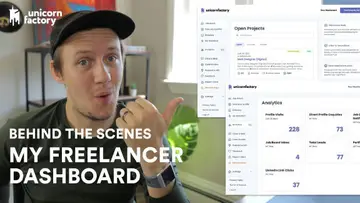
so inside of airtable i kind of have my
main
dashboard with all of my lessons and
different themes
where i can add videos and
update descriptions for the different
texts and all those types of things
so what i'm doing at the moment is i
plan out all of my videos in here
and then what i do is i just go and
write the outline
and then i just start recording the
video as soon as i've recorded the video
i also
write the about section and then from
there i have a workflow set up that then
allows me to send
all of the information that i populated
in here
to webflow so once all that information
has been sent to webflow it
automatically populates the different
fields and what's cool about that
is that i can now actually control the
data flow
from inside of airtable which means that
if i add
any new videos that are in between two
existing videos then i can automatically
update things like
the next lesson link or the previous
lesson link or the orientation link
while we're at it i might as well show
you the resource and action section so
what i do here is i
have um a link to a resource for example
in this particular case i link to
an introduction about the box model
inside of webflow
and what i do here is i just populate it
i select the lesson that i want it to be
sent to
and once that's all linked up it then
automatically adds through a collection
list that i added to the lessons page
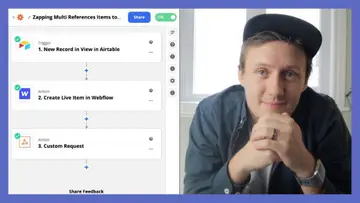
so in terms of zaps you know because
it's early days i don't have that many
yet but i do have one where i send the
tutorials
from ear table to um
web flows so again it's the standard
steps of
creating a new record in view creating
the actual lessons page inside of
webflow
and then using the custom request step
to also send through any additional
resources that i might want to link to
that particular lesson i also
set up a workflow for when i add a new
student to my
account so i create the accounts in
member stack at the moment
but what that then does is it
automatically creates a google drive
folder where i
store all of the videos that we um from
our one-on-one sessions
then it also creates a new user in the
accounts table inside of ear table
creates the dashboard
um and then it does a whole bunch of
updates to member stack into air table
just so all the data sits in the right
place and so that is the first
version of my e-learning platform
obviously it's still very early days it
doesn't have a lot of features
but it was a very fun use case to
experiment with inside of the airtable
webflow and zapier stack
but now the question becomes is building
an e-learning platform using this stack
better than actually using one of the
existing tools
let's first of all have a look at how
much it actually costs to use
my stack to build an e-learning platform
so
member stack is 25 a month i don't
actually process any of my transactions
through member stacks so i don't get
affected by the transaction fee
then web flow is 25 to 50
depending if you already have an account
you don't need to pay extra for an
account plan but i use cms hosting for
this so that is definitely another
25 i do however already pay
for the cms hosting for my personal
website which this e-learning platform
is
built on so uh to me that is not really
an additional cost
then airtable is 25 but again i'm
already using a table so i'm paying for
the pro
plan that would otherwise cost 25 then
zapier can be between 25 and 50 which
again i'm already paying for
because i'm using it for other platforms
like the unicorn factory
and then the only real thing that i did
have to pay for was
this thea to host all of my videos so i
paid this dear 99
a month and that is something that is
reasonably expensive but it is a really
great platform you can do really
fantastic things with the videos for
example
automatically generating captions adding
chapter titles to your videos
and the whole branding functionality is
quite nice as well
so really the main cost that i
personally have is an additional 125
a month which is the additional member
stack plan and the vista account
but if you were to start from scratch
you can see quite quickly that it does
add up to quite a bit now the question
is
what makes more sense building it
yourself or just using a platform like
teachable or podia
so as you all know i'm very biased
towards building online platforms
yourself using webflow airtable and
zapier
but i can tell you right now there is
absolutely
zero reason why you should be building
your own
custom e-learning platform with
platforms like podio or teachable
already out there
no matter how you look at it in every
regard using a platform like teachable
or podia just makes more sense
because for starters it's a lot cheaper
so the prices of using even the more
advanced plans that they have on their
websites it can range anything between
79.99
i am just paying that for this dear and
vistia is actually included in these
platforms which means that you'll
actually save money by just using a
platform like teachable or podia
so the second thing is you just get way
more useful functionality using a
platform like teachable and podia so
they have a whole bunch of tools
and systems already set up that allow
you to
integrate third-party tools to set up an
affiliate marketing program all those
types of things so
honestly you'd have to build all of
those things from scratch inside of
webflow your table and zapier
and a lot of the features that they have
you couldn't even really rebuild with
that stack
but what if you want to really customize
the look and feel of your e-learning
platform
even then you can actually customize a
whole lot with those platforms so really
the marginal benefit that you get from
using a design tool like webflow which
is definitely better you won't actually
get all the benefits that you get from
the existing
inbuilt features of these e-learning
platforms
so even if you are already a web flow
wizard you know your way around air
table you know heaps about zapier
you should definitely just stick to
using a platform that is already built
and fit for purpose
with all that being said i should
probably explain why i decided to build
my own
custom e-learning platform instead of
just using podia or teachable now the
main reason why i wanted to build it
from scratch was mostly because i wanted
to try out some different use cases
using the airtable webflow and zapier
stack
i'm always really interested to see how
far you can take these tools what kind
of use cases they solve and what use
cases they don't solve
in this case building an e-learning
platform just happened to align with the
kind of consulting work that i'm doing
and it was just a really good way to
experiment with different types of
features that the
awz stack has so if my priority was to
build an e-learning platform or an
online course i would definitely just
use podio or teachable to build it and
that is only because the focus should be
on the course creation not on the
building of the platform
so in conclusion if you want to practice
your airtable webflow and zapier stack
skills then this is definitely a fun
interesting use case to try out
but if your main goal is to build an
online platform or an e-learning
platform then just use one of the
existing tools that are already out
there
with that being said i hope this was an
informative video
if it was please hit like please
subscribe to the channel
and i'll be making more of these fun
videos in the future
other than that i hope you have a great
rest of your day goodbye