Update browser page title on tab change
A simple way to dynamically update the browsers page title on tab change in Webflow. A great way to add a dynamic element and user friendly method of updating page title on native Webflow tab change.
A simple way to dynamically update the browsers page title on tab change in Webflow. A great way to add a dynamic element and user friendly method of updating page title on native Webflow tab change.
How to add it
- Add the script to the closing body tag on your Webflow custom page settings
- Update the relevant class names to the tabs in the Javascript code snippet
The code
Javascript
                      <script>
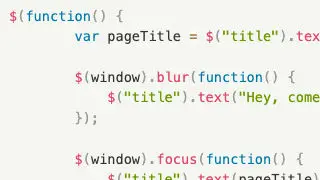
$(function() {
        var pageTitle = $("title").text();

        $(window).blur(function() {
            $("title").text("Hey, come back");
        });

        $(window).focus(function() {
            $("title").text(pageTitle);
        });
});
</script>